

How do you use content clusters to improve SEO?
Your website is like a small city. Every page is a building, and every topic is a neighborhood. Now, what happens if we start building this city in a smart, planned way? That’s exactly what clusters do in SEO.
So what are “clusters”?
In short, it’s a method for organizing your site’s content around specific topics, so Google (and, of course, your visitors) sees you as an expert.
Why does it matter so much?
1- Google likes experts.
When you concentrate a lot of quality content around one topic, Google understands that you really know what you’re talking about.
2- It improves the user experience. Visitors can easily find all the information they need on a given topic.
3- It increases your chances of ranking high. When you have many well-linked pages on the same topic, the chance that one of them (or all of them!) ranks high goes up significantly.
So how do you work with clusters?
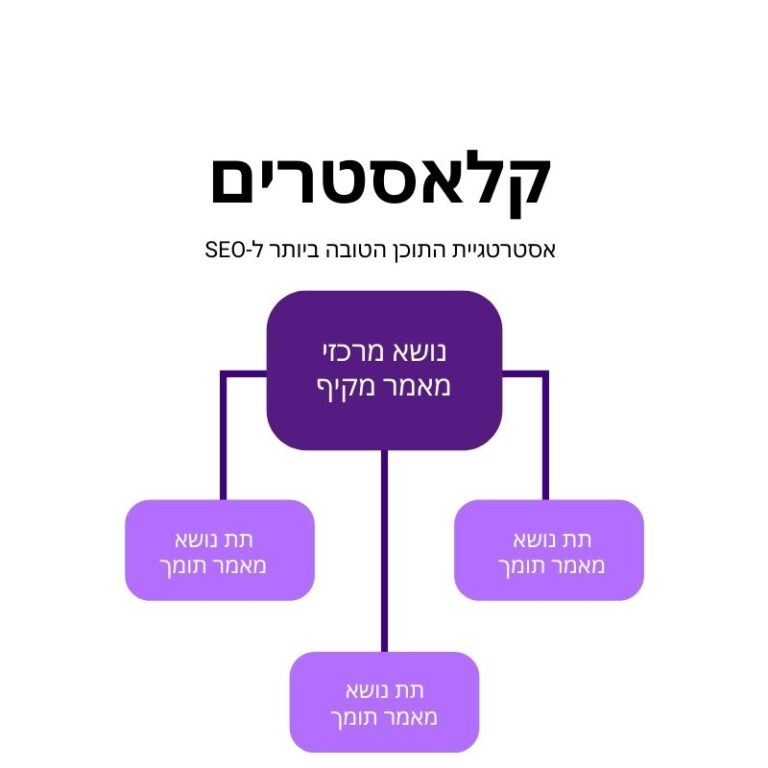
-Start by defining your core topics: what are the main topics your site covers? For example, if you run a bike shop, your topics could be: types of bikes, bike maintenance, riding accessories, trail routes, and so on.
-Create a pillar page for each topic: the pillar page is the “anchor” of the cluster. It should be comprehensive and in-depth, covering the topic from every angle.
-Build supporting pages: around each pillar page, build pages that focus on specific subtopics. For example, if the pillar page is about “types of bikes,” the supporting pages could cover mountain bikes, road bikes, e-bikes, and so on.
-Build internal links strategically: now it’s time to connect all the pages in the cluster. The pillar page should link to every supporting page, and the supporting pages should link back to it, and to each other when relevant.
-Update and refresh content: clusters are not “set and forget.” Update them regularly. Every core topic has trends and changes, so it pays to add new information and expand your clusters as needed.
But here’s the catch
Organizing your content nicely isn’t enough. The content itself has to be high quality, in-depth, and genuinely valuable to visitors. Clusters are like a frame, but you still need to fill it with a great picture.
Here’s an example:
Say you run a health and wellness site. One of your clusters could be about “healthy eating.”
Pillar page: “The Complete Guide to Healthy Eating”
Supporting pages:
“What are the macronutrients and why do they matter?”
“How to build a balanced weekly meal plan”
“Superfoods: are they really super?”
“Popular diets: pros and cons”
“Healthy eating by age: from childhood to the golden years”
All these pages link to each other, create a complete picture of the topic, and show Google (and visitors) that you really know what you’re talking about.
So does working with clusters really work?
Absolutely, but it takes planning, hard work, and patience. It’s a long-term strategy that builds your authority in your field over time.
If you want to start working with clusters and grow your site in a smart, effective way, here’s step one: start mapping your core topics. Which topics do you want to be known for? Which topics are your customers searching for? Start with the basics and build from there.
The DigiAssets Complete Checklist for Building Content Clusters
1. Research and preparation
- Identify your site’s core topics
- Do keyword research for each core topic
- Analyze your competitors: how do they organize their content?
- Define the target audience for each cluster
2. Cluster planning
- Choose a core topic for the cluster
- Define 5-10 relevant subtopics
- Plan the cluster structure (which page will be the pillar page, how the other pages will connect)
- Prepare a keyword list for each page in the cluster
3. Content creation
- Write a comprehensive pillar page on the core topic (at least 2000 words)
- Create content for each supporting page (at least 1000 words each)
- Make sure every page offers unique value and doesn’t repeat information from other pages
- Include a mix of media: images, video, infographics, etc.
4. SEO optimization
- On-page optimization for every page (titles, meta descriptions, image alt tags, etc.)
- Work keywords into the content naturally
- Make sure every page has an SEO-friendly URL
5. Internal links
- Link from the pillar page to every supporting page
- Link from the supporting pages back to the pillar page
- Link between supporting pages when relevant
- Use varied, relevant anchor text
6. Navigation and user experience
- Create a dedicated navigation menu for the cluster
- Consider adding a “table of contents” to the pillar page
- Make sure navigation between cluster pages is intuitive and easy
7. Promotion and exposure
- Promote the cluster’s pillar page on social media
- Consider creating companion content (like an infographic or video) that summarizes the cluster
- Build external links to the cluster’s pillar page
8. Measurement and optimization
- Set KPIs for each cluster (for example: rankings, traffic, time on page)
- Track the performance of every page in the cluster
- Spot opportunities for improvement (for example: pages with a high bounce rate)
9. Updates and maintenance
- Set a schedule for periodic content updates
- Add new, up-to-date information when relevant
- Assess whether the cluster needs to expand with new pages
10. Replication and expansion
- Identify other topics that could become clusters
- Plan how the different clusters will connect to each other
- Repeat the process for every new cluster
Want to learn how to grow your site's SEO without breaking the bank? Join the Squadron 👆


